
While uploading bulk contact data, duplicate entries can occur and affect data accuracy. MSGClub CRM automatically identifies these duplicates and provides unique Contact IDs (CIDs) for easy tracking.
Using CIDs, you can quickly manage and assign duplicate records to your sales team. This helps keep your data organised, reduces redundancy, and ensures a clean contact database.
Learn More
Step by Step Guide
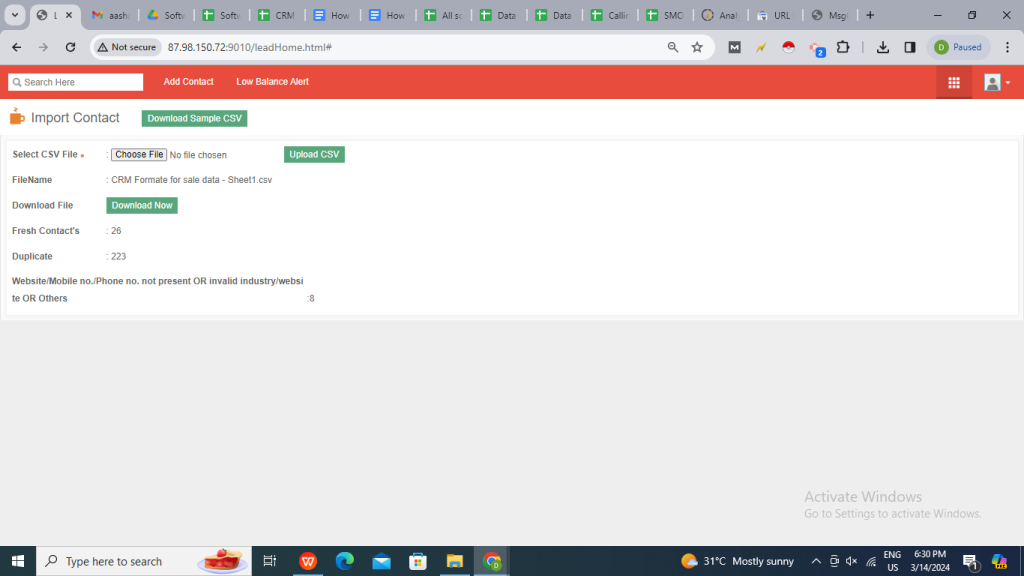
Step 1: Upload the file into CRM by selecting the file & clicking on Upload CSV button.
Step 2: Once the upload is complete, the system will display:
- Fresh Data (new contacts)
- Duplicate Data
- Remaining Data (if any records are not uploaded)
Step 3: To collect the CIDs of duplicate data, click on Download Now button.
Step 4: Open the file and take the CIDs given in the last column with the name – CONTACT ID FOR DUPLICATE DATA.
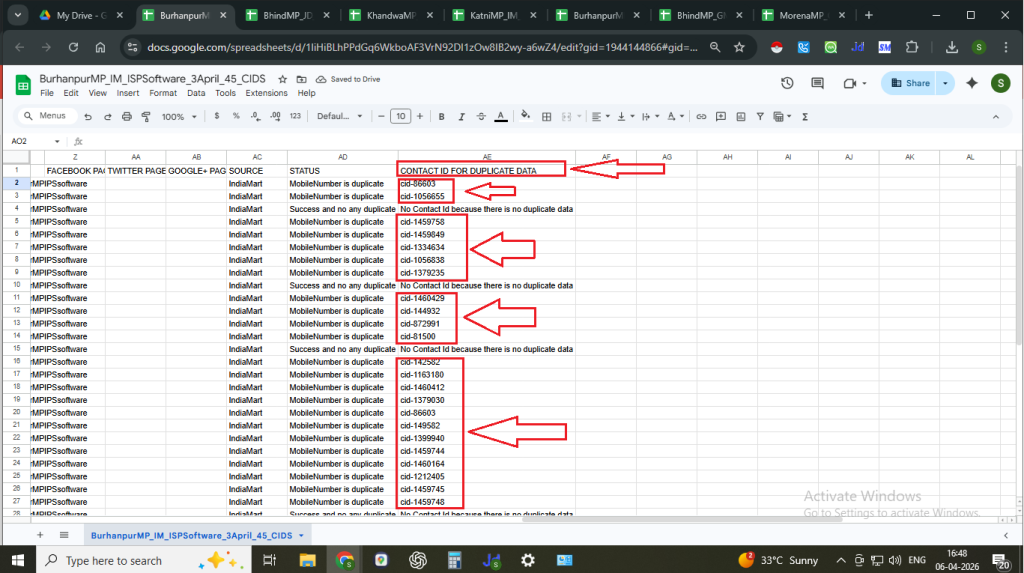
Copy the CIDs listed in this column & use them to assign duplicate contacts to the Sales team for further action.
Note: CIDs (Contact IDs) help uniquely identify duplicate records and ensure proper assignment without data confusion.
FAQs
Q. What is duplicate data in CRM upload?
Ans. Duplicate data refers to contact records that already exist in the CRM and are re-uploaded in the CSV file.
Q. What are CIDs?
Ans. CIDs (Contact IDs) are unique identifiers assigned to contacts in the CRM, used to track and manage records, especially duplicates.
Q. Why are CIDs important for duplicate data?
Ans. CIDs help you identify and assign duplicate contacts accurately without creating confusion or multiple entries.
Q. How can I get the CIDs of duplicate records?
Ans. You can download the upload report by clicking on Download Now, where CIDs are available in the column “CONTACT ID FOR DUPLICATE DATA.”
Q. Can duplicate data be assigned to the sales team?
Ans. Yes, using the extracted CIDs, duplicate contacts can be assigned to the sales team for further action.
Q. What happens to duplicate data after upload?
Ans. Duplicate records are not re-created but are identified separately and can be managed using their existing Contact IDs.
Q. Can I remove duplicate data from CRM?
Ans. Yes, duplicate records can be managed or cleaned manually within the CRM if required.
Q. Why is some data not uploaded?
Ans. Data may remain unuploaded due to formatting issues or validation errors in the CSV file.
1 comment
Comments are closed.