
RCS messaging for dental clinics
Branded cards for aligner changes, sitting reminders and treatment estimates, sent to the patient's default inbox and backed by SMS.
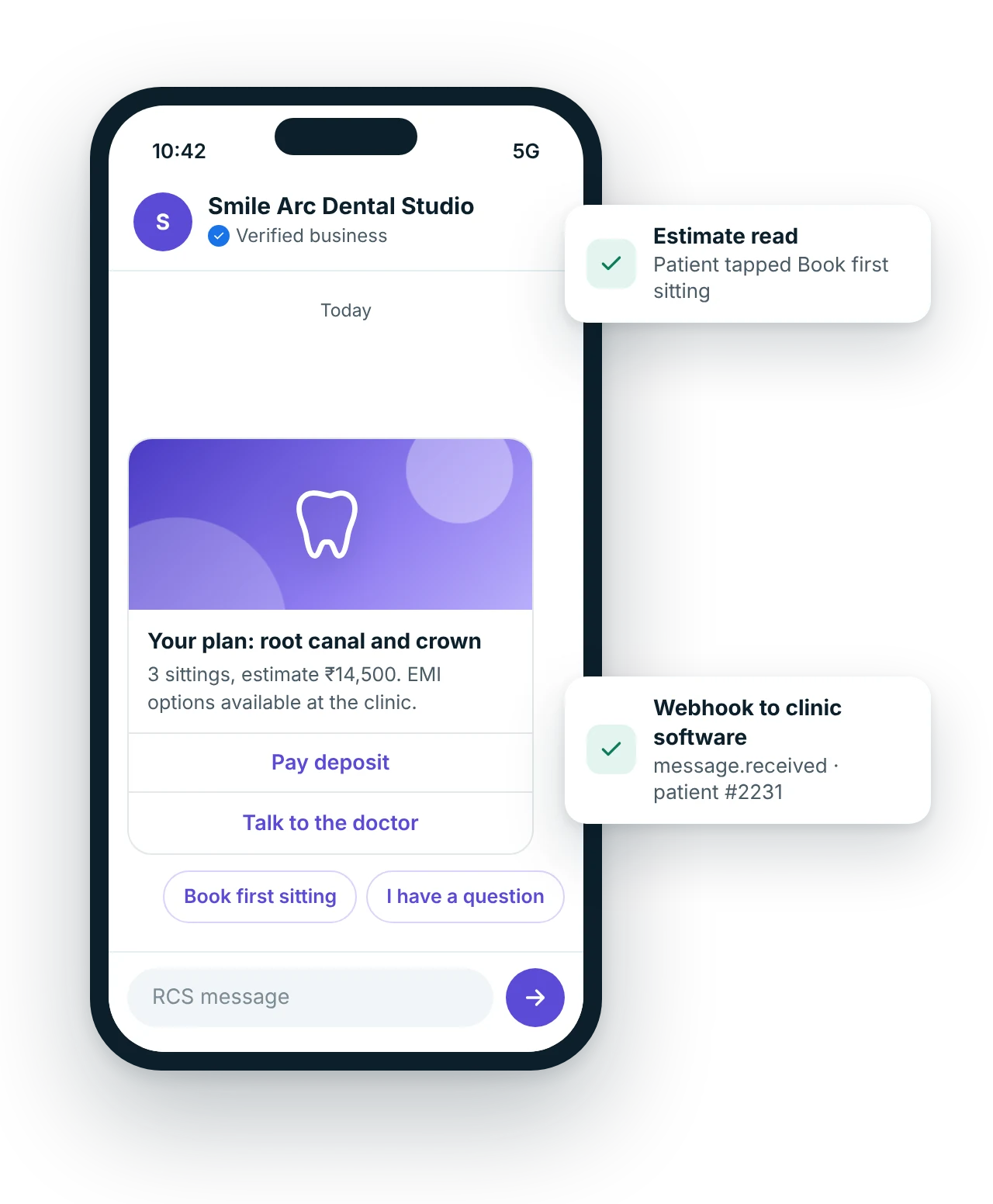
How do dental clinics use RCS messaging?
Dental clinics use RCS to send appointment cards with directions, aligner tray change reminders, root canal and crown sitting reminders, treatment estimates with Pay deposit and EMI buttons, aftercare instructions with a Call clinic action and six-month cleaning recalls. Patients see the clinic's verified logo, and SMS fallback reaches phones that cannot receive RCS.
Updated
Key facts: RCS for dental clinics
- Channel
- RCS messaging
- Best for
- Aligner tray change; Treatment estimate card; Sitting reminder
- Formats
- Text with actions, Rich card, Suggested replies
- Who it suits
- Dental clinics, Orthodontic and aligner practices, Implant centres, Paediatric dentists
- Sender
- Brand name, logo and verified mark, set up as an RCS agent; DLT-approved SMS fallback for phones that cannot receive RCS
- Pricing model
- Per message, by message type; fallback billed as SMS. How pricing works
- Integration
- REST API and webhooks (message.delivered, message.read, message.clicked) into your own software. RCS API
What problems does RCS solve for dental clinics?
Which RCS messages work for dental clinics?
Ready-to-use RCS message templates for dental clinics
Copy, edit and use these as a starting point.
Title: Your treatment plan: {{procedure}}
Body: {{sittings}} sittings, estimate ₹{{amount}}. EMI options are available at the clinic.
Buttons: Pay deposit | Talk to the doctor
Title: Switch to tray {{tray_no}} today
Body: Wear it about 22 hours a day. Your next scan at {{clinic}} is on {{date}}.
Buttons: Add scan to calendar | Call clinic
Title: Six months since your last cleaning
Body: Book a scaling and check-up at {{clinic}}. Open {{days}}, {{hours}}.
Buttons: Book cleaning | Get directions
Rich cards and buttons are set up per campaign in your MsgClub panel; text is editable.
How does RCS work for dental clinics?
- The chairside plan is savedThe dentist records the treatment plan, sittings or aligner schedule in your practice software.
- MsgClub sends the cardPatients with RCS get the branded card; others get a short SMS with a link.
- The patient decides at homePay deposit, Book first sitting or a question chip goes back to the clinic.
- The front desk follows upReplies and taps arrive in the panel or your software by webhook.
Which other channels suit dental clinics?
Use them together from one account, with shared contacts, reports and webhooks.
Questions about RCS messaging for dental clinics
Can we send a treatment estimate by RCS?
Yes. A rich card can show the procedure, the number of sittings and the estimate, with Pay deposit and Talk to the doctor buttons. Keep the full itemised plan on a PDF or portal link and the card short enough to read on one screen.
Is RCS useful for aligner patients?
Yes. Aligner patients need regular nudges to switch trays and come in for scans, and most use smartphones. A short card with wear-hours advice and an Add scan to calendar action keeps them on schedule without a staff call.
What do patients without RCS receive?
They receive the DLT-approved SMS fallback you set for the campaign, usually the date, time and a link. The MsgClub report shows how many patients got RCS and how many got SMS, so you can judge the split for your clinic.
Should a dental clinic use RCS or WhatsApp?
Many use both. RCS is good for scheduled, branded reminders and estimates because it needs no WhatsApp opt-in and falls back to SMS. WhatsApp is better for sharing X-ray images and two-way chats with patients who have messaged the clinic.
Can we send six-month cleaning recalls to all past patients?
Only to patients who agreed to receive reminders and offers. A recall card with a Book cleaning button is promotional in nature, so it needs consent and a way to stop messages, and its SMS fallback must follow promotional hours and DND rules.
How soon after an extraction should aftercare go out?
The same evening works well, once the anaesthesia has worn off. Keep it to four or five plain steps and add a Call clinic action for bleeding or swelling that does not settle, so the patient knows whom to contact.
Which other industries use RCS messaging?
RCS use-case guides for dental clinics
All RCS industriesAll RCS use casesRCS messagingAPI and webhooksPricing
Start sending in minutes
Create a free account to test the panel and API, or talk to our team about volumes, DLT setup and CRM integration.