
WhatsApp Business API provider in India
Send order updates, reminders, OTPs and offers on the app your customers open most. Answer them from a shared team inbox, automate common questions with a no-code chatbot, and connect it all to your CRM through an API and webhooks.
- Onboarding on Meta's official platform
- Templates in Hindi, English and regional languages
- Many agents on one number
- REST API and webhooks
What is the WhatsApp Business API?
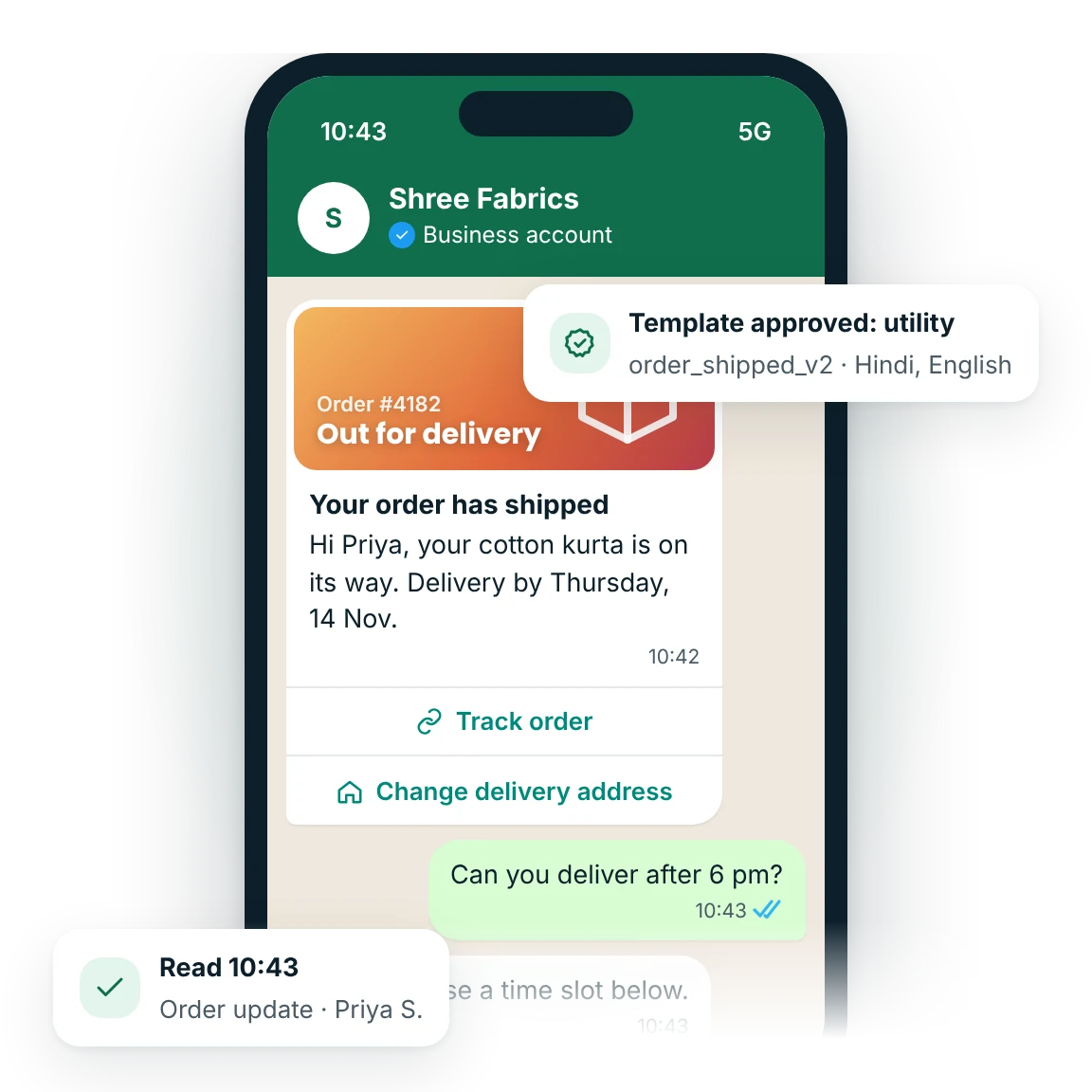
The WhatsApp Business API, part of Meta's WhatsApp Business Platform, lets medium and large businesses message customers on WhatsApp at scale through a provider. It supports approved template messages, chatbots, a shared multi-agent inbox and integration with CRMs and apps. Meta charges per delivered template message, by category and country.
Updated
WhatsApp Business API at a glance
- Platform owner
- Meta; MsgClub provides onboarding, dashboard, inbox and API
- Message types
- Approved templates any time; free-form replies within 24 hours of the customer's last message
- Template categories
- Marketing, utility and authentication
- Billing
- Meta's per-message rate by category and country, plus a MsgClub platform fee
- Requirements
- Meta Business portfolio, a phone number, a display name and customer opt-in
- Sending limit
- Set by Meta per business portfolio and raised as you verify and send good-quality messages
- Ways to use it
- Web panel, mobile app, REST API, webhooks and plugins
- Support
- Monday to Saturday, 10 am to 7 pm IST
WhatsApp Business app or WhatsApp Business API?
Both show your business name and profile to customers. They are built for different sizes of operation.
| Point of difference | WhatsApp Business app | WhatsApp Business API |
|---|---|---|
| How you use it | Phone app, plus a few linked devices | Provider dashboard, mobile app or your own software |
| People replying | One owner and a handful of linked devices | Many agents in a shared team inbox, with assignment and notes |
| Messaging many customers | Broadcast lists, only to people who saved your number | Approved templates to any customer who opted in |
| Automation | Greeting and away messages, quick replies | Chatbots, triggered alerts, CRM and store integrations |
| Rich messages | Catalogue and basic media | Buttons, lists, carousels, catalogues, flows, location and address requests |
| Verified badge | Meta Verified subscription, where offered | Official business account request through Meta |
| Cost | Free app | Meta's per-message charges plus a provider fee |
If one or two people answer every chat from a phone, the app may be enough. Once you need several agents, automation or messages triggered by your software, you need the API.
What can you do with MsgClub WhatsApp Business API?
One verified number, one dashboard and one API for every WhatsApp conversation your business has.
Which WhatsApp template categories are there?
To start a conversation, or to message a customer more than 24 hours after they last wrote to you, you must use a template that Meta has approved. Meta puts every template in one of three categories, and each is priced differently.
Meta reviews each template, usually within minutes to a day, and can change its category if the content does not match. Free-form text, images and documents that you send while the customer service window is open are called service messages and need no template.
What is the 24-hour customer service window?
Each time a customer messages you, a 24-hour customer service window opens or restarts. Inside it you can reply with any message type, including free-form text, media, buttons and lists, Since 1 October 2026, under Meta's current pricing, the first 1,000 service replies per business number each month are free and later ones are charged per message. Utility templates are charged even inside an open window. Check Meta's rate card for the latest rules.
When the window closes, you can only reach the customer again with an approved template, which Meta charges for. Customers who reach you from a Click-to-WhatsApp ad or a Facebook page button open a longer free entry point window: if you reply within 24 hours, Meta does not charge for messages, templates included, for up to 7 days after a Click-to-WhatsApp ad (since 21 September 2026) or 72 hours after a Page button.
What are the opt-in rules?
Meta's WhatsApp Business Messaging Policy says you may only message people who have given you their number and agreed to receive WhatsApp messages from your business. The opt-in should name your business and make clear the messages will come on WhatsApp.
- Collect opt-in on your website, checkout, app, a form or a missed call, and keep a record
- Honour opt-out requests such as "Stop" straight away
- Treat customer data as the DPDP Act 2023 requires: a clear purpose and consent
Every agent, one WhatsApp number
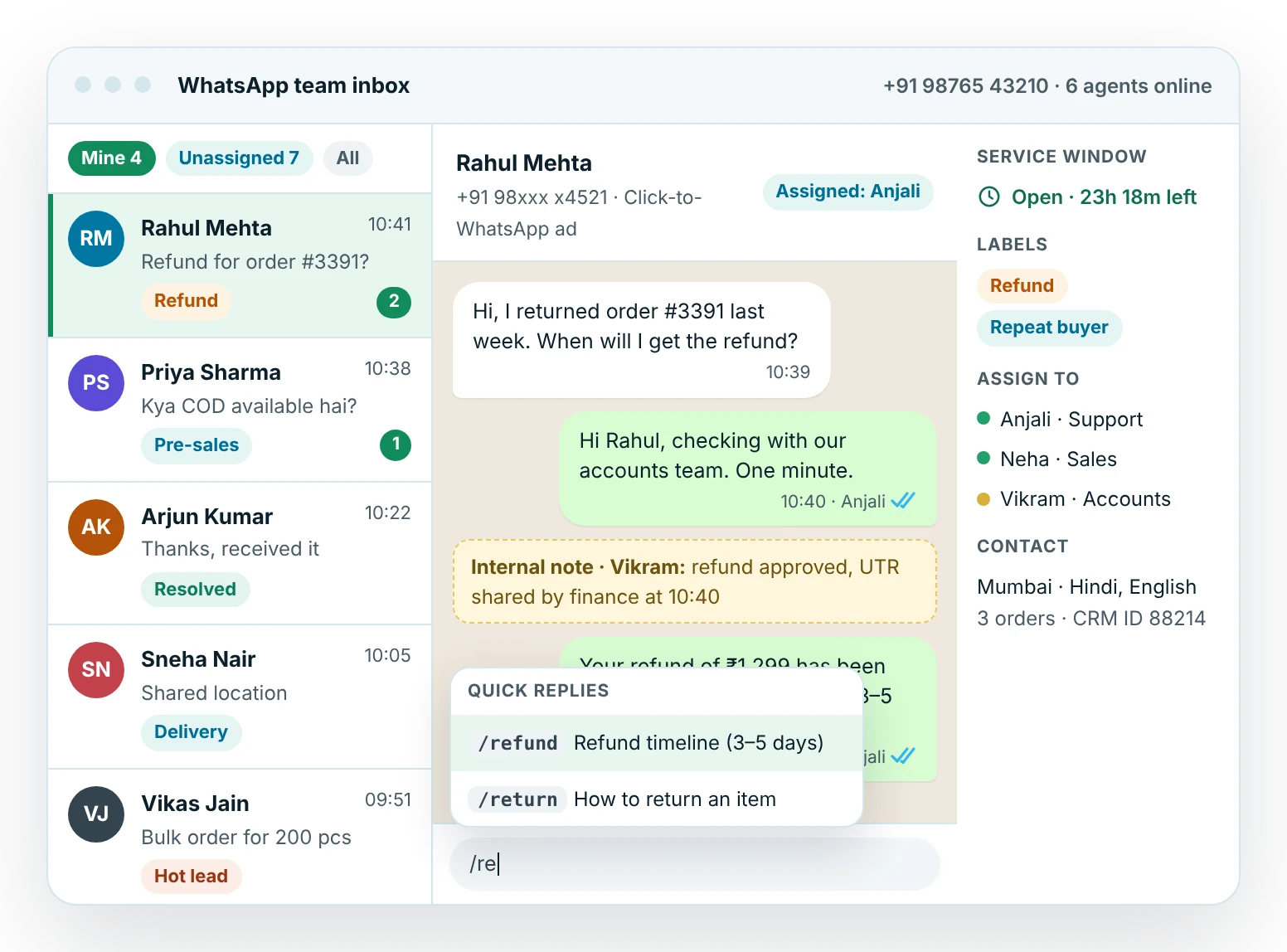
Chats from broadcasts, ads, QR codes and your bot land in one inbox. Assign them to the right person, label them, add internal notes and reply with saved quick replies.
- Mine, unassigned and all-chats views for each agent
- Countdown for the 24-hour window on every chat
- Web panel and mobile app
How do you get the WhatsApp Business API?
Most steps happen inside Meta's own tools, so your business stays the owner of the account and number. Our onboarding team guides you through each one.
- Meta Business portfolioCreate one, or use your existing portfolio (earlier called Business Manager), for your company.
- Phone numberPick a mobile or landline number that can receive a verification SMS or call.
- Display nameChoose the name customers see. Meta checks that it matches your business or website.
- Business verificationSubmit documents such as your GST or incorporation certificate to raise your messaging limit.
- Templates and go liveGet your first templates approved, import opted-in contacts and start sending.
A new business portfolio can start conversations with up to 250 unique customers in a rolling 24 hours. Meta raises this to 2,000 once your business is verified or you show good-quality sending, and then step by step to 10,000, 100,000 and unlimited. How messaging limits work
How much does the WhatsApp Business API cost?
Your bill has two parts. Meta charges for each delivered template message at a rate set by the template category and the customer's country, with lower utility and authentication rates at higher monthly volumes. MsgClub adds a platform fee for the dashboard, inbox, chatbot and API, quoted on your volume.
Since 1 October 2026, under Meta's current pricing, service replies inside the 24-hour window are free up to 1,000 per business number each month and charged after that, and utility templates are charged even inside the window. Check Meta's rate card for the latest rates for India.
- Marketing templates × Meta's marketing rate
- Utility templates outside the window × utility rate
- OTP templates × authentication rate
- Service replies and in-window utility: no Meta charge
- Plus the MsgClub platform fee
How do Indian businesses use WhatsApp?
Explore WhatsApp Business API
Connecting WhatsApp to your CRM, store or ERP? See API and webhook integrations.
WhatsApp use cases
Step-by-step guides with templates, best practices and what to measure.
WhatsApp by industry
See how businesses like yours use WhatsApp, with sample messages and ready-to-use templates.
Healthcare
Lending & subscriptions
Retail & hospitality
Education & hiring
Property
Auto & home services
Legal & finance
Business & public sector
Frequently asked questions
Who is eligible for the WhatsApp Business API?
Any registered business that follows Meta's WhatsApp Business and Commerce policies can apply. You need a Meta Business portfolio, a phone number that can receive a verification SMS or call, and a display name that matches your brand. Some categories, such as gambling, weapons and adult content, are not allowed under Meta's commerce policy.
Can I use my existing WhatsApp number for the API?
Usually yes. A number already active on the WhatsApp or WhatsApp Business app must normally be moved off the app before it is registered on the API, and the chat history on the phone does not move with it. Where Meta's coexistence option is available for your number, our team will explain whether it suits you.
How long does WhatsApp Business API onboarding take?
Connecting a number and display name usually takes a day or two once your Meta Business portfolio is ready. Meta business verification, which raises your messaging limit, can take from a few days to a few weeks depending on how quickly your documents are accepted. You can send to a limited number of customers while verification is pending.
Can I send bulk messages to anyone on WhatsApp?
No. You can only message people who have opted in to receive WhatsApp messages from your business, and any message that starts a conversation must use a template approved by Meta. Sending to people who did not agree leads to blocks and reports, which lower your quality rating and can restrict your account.
Is DLT registration needed for WhatsApp messages?
No. TRAI's DLT system applies to commercial SMS and voice calls on Indian telecom networks, not to WhatsApp. WhatsApp has its own rules instead: Meta approves every template, you need customer opt-in, and Meta's commerce and messaging policies apply. Personal data you collect is still covered by the DPDP Act 2023.
What is the difference between the WhatsApp Business app and the API?
The free WhatsApp Business app runs on a phone and suits small shops with one or two people replying. The API has no app of its own; you use it through a provider's dashboard or your software, which allows many agents on one number, chatbots, broadcasts to opted-in customers and CRM integration.
How much does the WhatsApp Business API cost in India?
You pay Meta's per-message rate for each delivered template, which depends on the category (marketing, utility or authentication) and the customer's country, plus MsgClub's platform fee. Since 1 October 2026, under Meta's current pricing, service replies in the 24-hour window are free up to 1,000 per number each month, then charged. See the pricing guide for an estimate.
How many WhatsApp messages can I send per day?
Meta sets a messaging limit on how many unique customers your business can start conversations with in a rolling 24 hours. It starts low for new accounts and rises automatically as you send good-quality messages to opted-in customers. Replies to customers who message you first do not count towards this limit.
Related products
Use them together from the same MsgClub account, with one API and shared reports.
Start sending in minutes
Create a free account to test the panel and API, or talk to our team about volumes, DLT setup and CRM integration.