
WhatsApp Business API for law firms and advocates
Remind clients of the next hearing, share orders and drafts, collect documents and send fee notes from a chamber number, not a junior's phone.
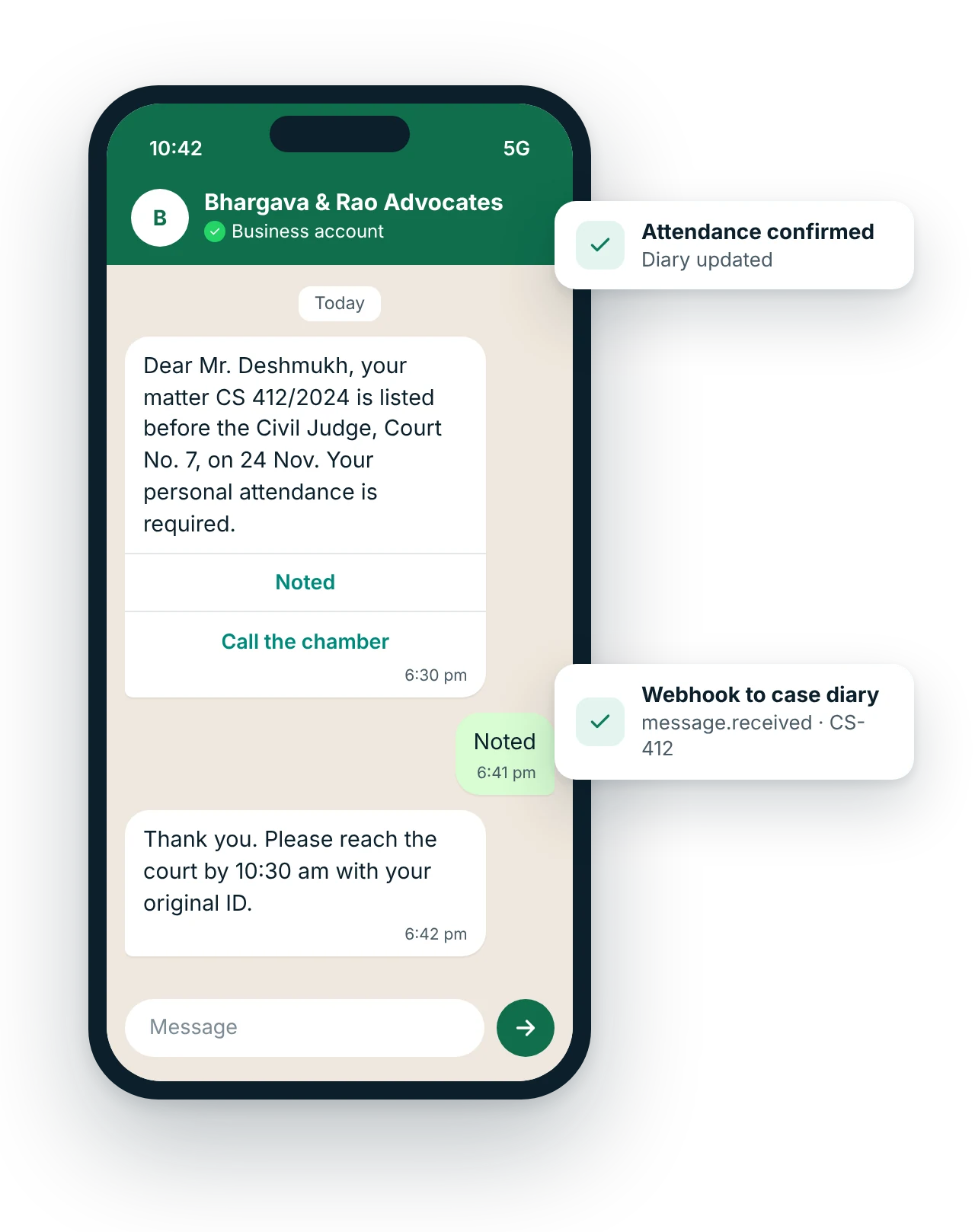
How can law firms use WhatsApp Business API?
Law firms and advocates use WhatsApp Business API to remind clients of hearing dates and what to bring, share certified copies, orders and draft agreements, collect signed vakalatnamas and supporting documents, confirm consultation appointments and send fee notes, while keeping every client conversation on one chamber number. Bar Council rules restrict advertising, so promotional broadcasts are not appropriate.
Updated
Key facts: WhatsApp for law firms and advocates
- Channel
- WhatsApp Business API
- Best for
- Hearing date reminders; Post-hearing update; Document collection
- Message types
- Utility template, Service reply, Chatbot
- Who it suits
- Litigation chambers, Corporate and property law firms, Individual advocates with clerks, Legal process and documentation teams
- Rules
- Meta-approved templates and customer opt-in; free-form replies only within 24 hours of the customer's last message
- Pricing model
- Meta's per-message rate by template category, plus a MsgClub platform fee. WhatsApp API pricing explained
- Integration
- REST API and webhooks (message.delivered, message.read, message.received) into your own software. WhatsApp API
What problems does WhatsApp solve for law firms and advocates?
Which WhatsApp messages should law firms and advocates send?
Ready-to-use WhatsApp templates for law firms and advocates
Copy, edit and use these as a starting point.
Dear {{1}}, your matter {{2}} is listed before {{3}} on {{4}}. {{5}}. Please confirm that you have noted the date.
[Noted] [Call the chamber]
Dear {{1}}, in matter {{2}}, today's listing was {{3}}. The next date is {{4}}. Your advocate will share details if any action is needed from you.
Dear {{1}}, the fee note for {{2}} in matter {{3}} is attached. Amount: ₹{{4}}, payable by {{5}}.
[Pay now] [Query on fee note]
Submit each template to Meta for approval in your MsgClub panel. {{1}}, {{2}} are variables.
How does WhatsApp work for law firms and advocates?
- Case diary holds the datesYour practice management software or case diary records each matter's next date and the client's number.
- MsgClub sends remindersHearing reminders go out at the intervals you set, with attendance instructions where needed.
- Clients reply to the chamberConfirmations, questions and documents reach the clerk or junior assigned to the matter.
- Updates after each listingOnce the next date is entered, the client gets the update and the record syncs back by webhook.
Which other channels suit law firms and advocates?
Use them together from one account, with shared contacts, reports and webhooks.
Questions about WhatsApp Business API for law firms and advocates
Can advocates use WhatsApp for marketing in India?
No. Rule 36 of the Bar Council of India Rules prohibits advocates from soliciting work or advertising, beyond limited website information the Council permits. A law firm's WhatsApp number should serve existing clients with reminders, updates and documents, not broadcast offers to new people.
Is it safe to share legal documents on WhatsApp?
WhatsApp encrypts messages in transit, and the team inbox keeps documents on the chamber's number rather than staff phones. For highly sensitive matters, share a password-protected PDF or a secure link, and confirm the client's number before sending anything privileged.
Can clients send scanned documents and photos?
Yes. Clients can send photos and PDFs of deeds, notices and IDs in reply to a message or after writing to you. The clerk tags the chat with the matter number so documents are easy to find when drafting.
Can a hearing reminder be sent automatically?
Yes. If your case diary is in software or a Google Sheet, MsgClub can send the reminder a set number of days before each date. The template is a utility message because it concerns the client's own matter.
Should court updates go by WhatsApp or a call?
Routine next-date updates suit WhatsApp because the client has them in writing. Adverse orders, settlement offers and anything needing a decision deserve a call from the advocate first, followed by a written summary in the chat.
Can several advocates and clerks share one chamber number?
Yes. Each person gets a login to MsgClub's team inbox, and chats are assigned by matter. The senior can see every conversation, and the history stays with the chamber when a junior moves on.
Which other industries use WhatsApp Business API?
WhatsApp use-case guides for every industry
All WhatsApp industriesAll WhatsApp use casesWhatsApp Business APIAPI and webhooksPricing
Start sending in minutes
Create a free account to test the panel and API, or talk to our team about volumes, DLT setup and CRM integration.